 Remember the 80's? There was a trend of using the word "bad" to imply "good." A statement you might hear would be, "Man, those shoes are BAD!" That person didn't really mean the shoes were inferior in any way; it was a compliment. The word took on an opposite meaning from its original intent.
Google has followed a similar concept with the naming of their new browser, Chrome. In the world of web browsers, "chrome" is a reference to the screen real estate that exists outside of the page you are viewing. Things like the address bar, scrollbars, bookmark bar, add-ons, tabs, etc. are all considered chrome. The irony of this is that this browser contains the least amount of chrome of any browser I've ever used.
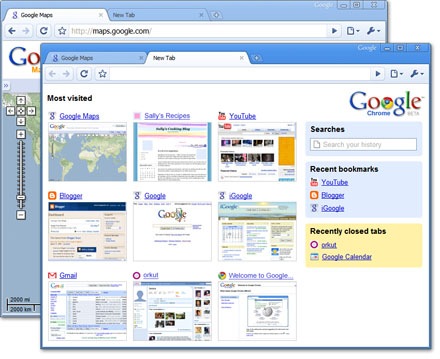
The Chrome browser is the definition of a simple web experience. As stated, it has minimal visible features: forward/back navigation, an address box, and a few buttons. It allows for tabbed viewing, and the tabs themselves are located at the very top of the application. The status bar at the bottom of the application is only viewable when pages are loading. Chrome leaves a ton of room to display the page, thus putting the emphasis on the web experience as opposed to the software itself.
My first impression upon using Chrome is that I like it. It will not replace FireFox for me, simply because I use a lot of the add-ons specific to web developers that FF offers, but I will probably recommend Chrome for Internet Explorer users. There are so few settings in Chrome, it almost seems impossible to mess up the web experience by accidentally turning on a feature you didn't really need.
There is also a useful "incognito" mode for browsing without leaving a history. I'll be using that the next time I'm buying birthday presents for my wife online. This seems like a useful option.
I really love the single text box for search, bookmarks, history, and address lookup. Bookmarking is incredibly easy too. There is a star next to the search box that instantly bookmarks the page and allows you to quickly choose a location for it.
The idea of putting the tabs at the top is a nice touch as well. Arranging those tabs is easily done by dragging them in the order you prefer.
File downloads are really simple, and the browser actually places links to the files at the bottom of the page once they are complete. Forget those annoying pop-ups common in IE and FireFox.
One really useful feature is the browser's ability to keep track of the sites you visit the most, and then displaying thumbnails/links to those pages on the browser's "home" page. I've used that feature a lot already.
Aside from all the bells and whistles (or lack thereof), Chrome seems fast. I don't know if that's because it breaks everything running behind the scenes into separate processes, or if it just has less going on. Either way, it does seem to load sites faster than IE and FireFox.
The only problem I've noticed so far involves sites with plugins, such as sites that require Windows Media Player. When I try to run these pages, I click the link to install the plugin and am not sure which browser option to choose because Chrome is not one of those options. I assume this is a problem with Chrome being all of 1-day old and I expect this problem to be solved shortly.
I highly recommend Chrome for every day browsing and web applications. Go ahead, close your Internet Explorer browser and start using Chrome. It's simple, puts the emphasis on the web itself, and works great. Nice work, Google.
Visit the Google Chrome homepage for more information.


 Posts



